Bluebook Citation Generator & Checker
Put every citation in your brief in Bluebook form, with the rule behind each change and Word tracked changes. Free, no account; your brief stays in your browser.
Choose your brief to put every citation in Bluebook formDrop your brief to put every citation in Bluebook form
A Word file (.docx) or a PDF
A real, public brief filed at the U.S. Supreme Court (Greer v. United States).
Read on this device. The brief is never uploaded.How we know: Bluebook privacy
Started a brief on this device? Continue it from Recent
A free Bluebook citation generator and checker, in your browser
Open your Word file and get the corrections back as tracked changes, or open the PDF for a review report. Each citation is corrected with the rule behind the change, and Id. and short forms are checked against the document around them. You can also paste the brief, a list of citations or your footnotes.
Three steps
How to check the Bluebook citations in a brief
The screens below are the app on a real, public filing: the petitioner's merits brief in Greer v. United States (U.S. Supreme Court, No. 19-8709).
Step 1: Open the brief
Drop the Word file or the PDF, or paste the text. It is read in this browser tab and every citation is checked in document order. The summary sorts them before you start: questions you must answer, your calls, and changes already made for you.
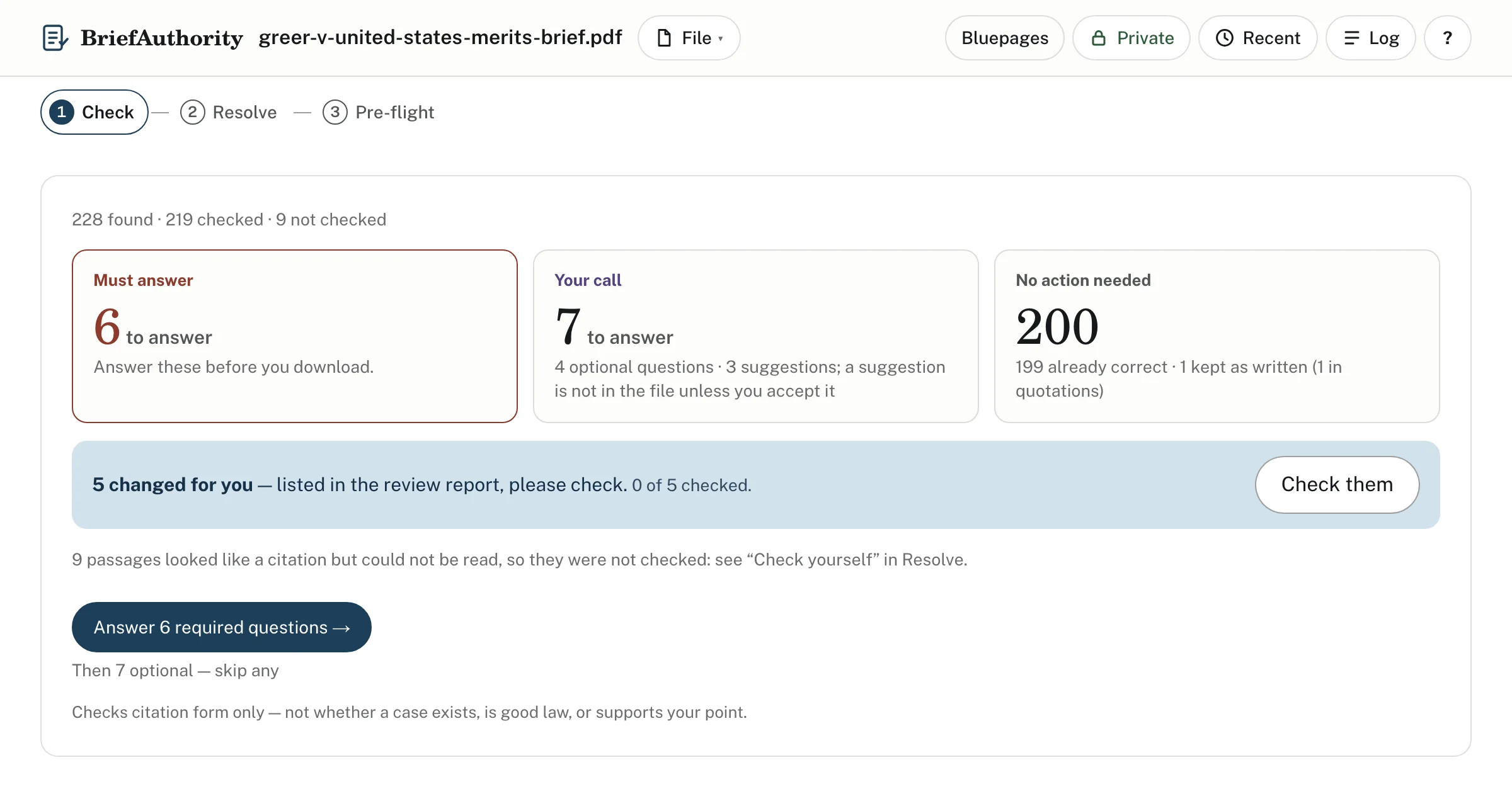
Greer v. United States merits brief: 228 citations found, 6 must be answered before download. Step 2: Review each change and its rule
Each change names the Bluebook rule or table behind it, and you can mark it wrong or edit it. Lower-confidence rewrites are suggestions that stay out of the file unless you accept them. Missing facts, such as the circuit for a Federal Appendix case, are asked for, never guessed.
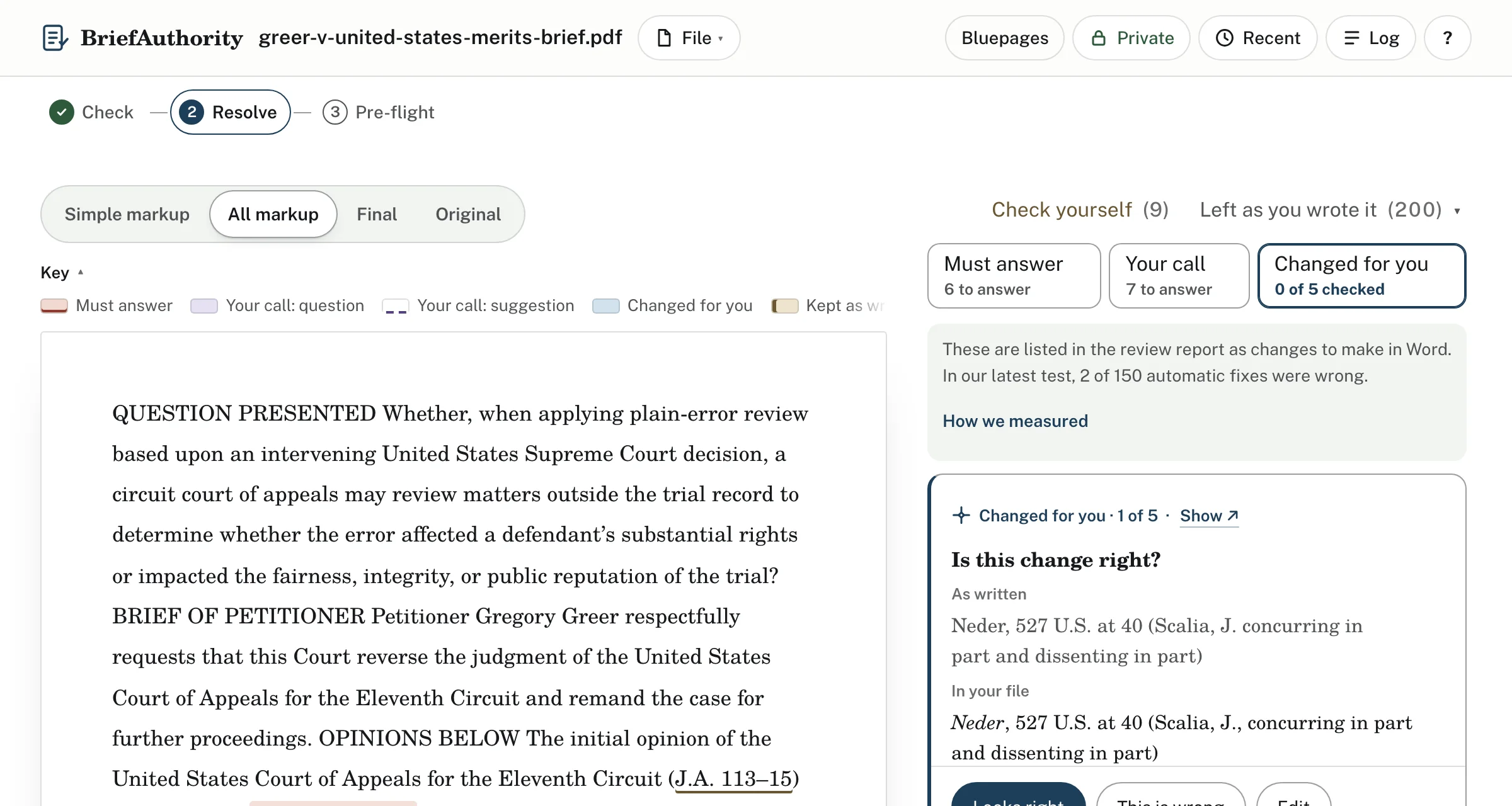
Each change made for you is yours to confirm, edit or mark wrong. Step 3: Pre-flight, then download
Pre-flight lists anything still open before the download. A Word file comes back as your own document with each correction as a tracked change you can accept or reject; a PDF gives a review report listing every change to make in Word.
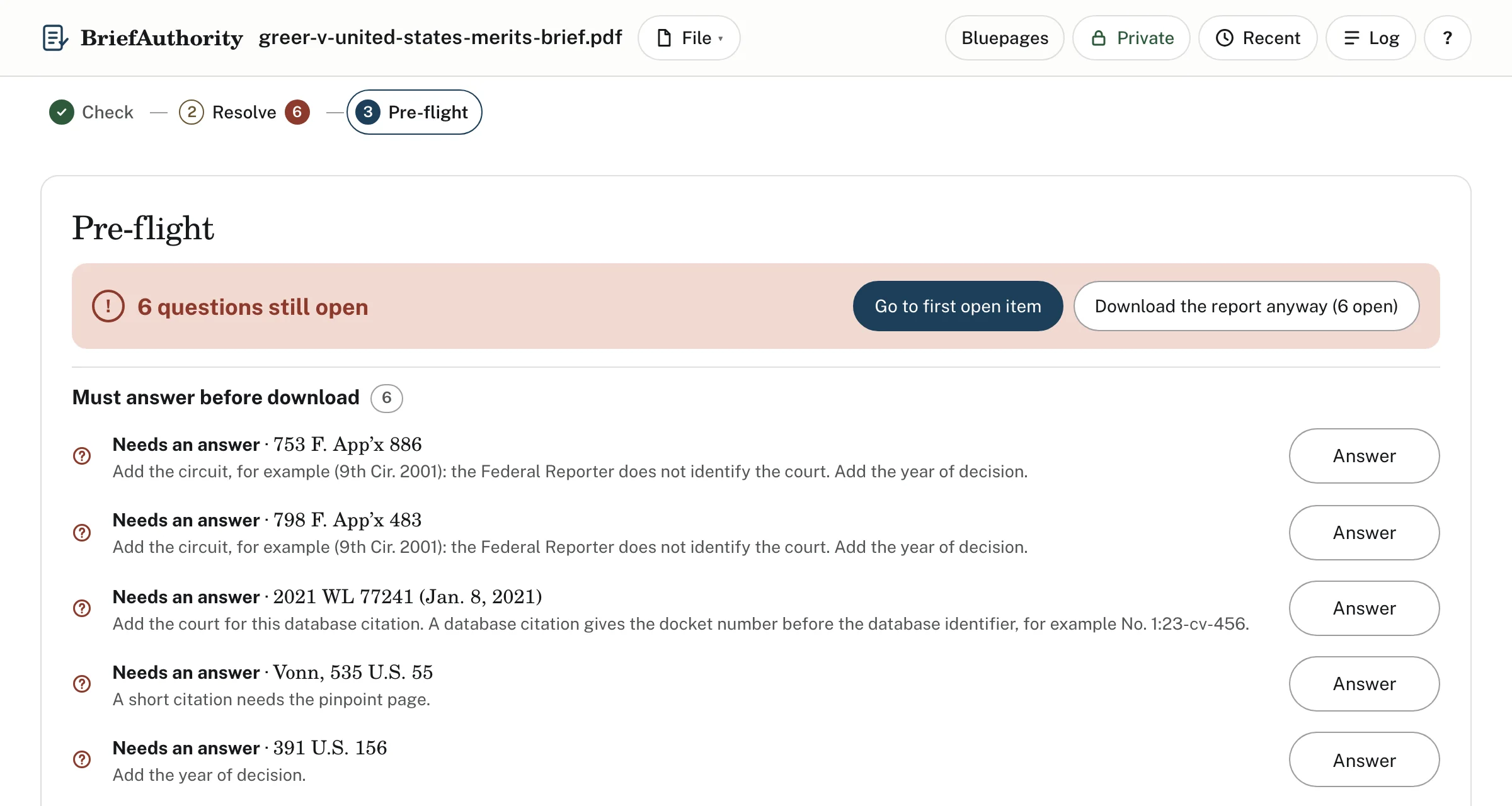
Open questions are listed before the download, never hidden in it.
Open the same brief in the checker and see every result for yourself. It is a public filing; nothing of yours is used.
The checker's own output
What gets corrected
These are the checker's own results for the inputs shown, with the rule behind each change.
Case names in citation sentences
As written
See Bell Atlantic Corporation v. Twombly, 550 U. S. 544, 556 (2007)
Bluebook form
See Bell Atl. Corp. v. Twombly, 550 U.S. 544, 556 (2007)
- T1; R. 6.1(a)Abbreviate the reporter as "U.S.".
- R. 10.2.2; T6; T10Abbreviate case-name words in citations: "Atlantic" → "Atl.", "Corporation" → "Corp.".
Statutes and rules
As written
42 USC §1983
Bluebook form
42 U.S.C. § 1983
- R. 12.3; T1Abbreviate the United States Code as "U.S.C.".
- R. 6.2(c)Put a space after the section symbol.
As written
F.R.C.P. 12(b)(6)
Bluebook form
Fed. R. Civ. P. 12(b)(6)
- R. 12.9.3; T1Cite the rules as "Fed. R. Civ. P.".
As written
U.S. Const. amend. 14, § 1
Bluebook form
U.S. Const. amend. XIV, § 1
- R. 11Use Roman numerals for amendments: "amend. XIV".
Unreported decisions
As written
Smith v. Jones, 21-cv-1234, 2022 WL 123456, at *3 (S.D.N.Y. January 5, 2022)
Bluebook form
Smith v. Jones, No. 21-cv-1234, 2022 WL 123456, at *3 (S.D.N.Y. Jan. 5, 2022)
- R. 10.8.1; T12Write the date as "Jan. 5, 2022".
- R. 10.8.1(a)Introduce the docket number with "No.".
Supreme Court parallels
As written
Ashcroft v. Iqbal, 556 U.S. 662, 678, 129 S.Ct. 1937, 173 L.Ed.2d 868 (2009)
Bluebook form
Ashcroft v. Iqbal, 556 U.S. 662, 678 (2009)
- T1; R. 6.1(a)Abbreviate the reporter as "S. Ct.".
- T1; R. 6.1(a)Abbreviate the reporter as "L. Ed. 2d".
- R. 10.3.1; B10.1.3Cite only the U.S. reporter for a Supreme Court decision; drop 129 S. Ct. 1937 and 173 L. Ed. 2d 868.
Courts and dates
As written
Jones v. Acme Insurance Company, Inc., 123 F.3d 456, 460-462 (Ninth Circuit March 3, 1997)
Bluebook form
Jones v. Acme Ins. Co., 123 F.3d 456, 460-62 (9th Cir. 1997)
- R. 10.5(a)Give only the year for a reported decision: "March 3, 1997" → "1997".
- R. 10.2.1(h)Omit "Inc.": the name already shows a business firm.
- R. 10.2.2; T6; T10Abbreviate case-name words in citations: "Insurance" → "Ins.", "Company" → "Co.".
Secondary sources
As written
Cass R. Sunstein, Interpreting Statutes in the Regulatory State, 103 Harvard Law Review 405, 410-415 (1989)
Bluebook form
Cass R. Sunstein, Interpreting Statutes in the Regulatory State, 103 Harv. L. Rev. 405, 410-15 (1989)
- R. 16.4; T6; T13Abbreviate the periodical as "Harv. L. Rev." (T6 words; T13 institution names).
- R. 3.2(a)Write page spans with a hyphen and keep the last two digits: "410-415" → "410-15".
Whole documents
Built for the whole document
In context
Context, not one line at a time
Id. is accepted only after the same single authority; a short form before its full citation is expanded; supra for a case becomes a short citation. Footnote order is part of the check.
Explained
A reason for every change
Each correction names its rule or table, such as R. 10.2.2 and T6 for case-name abbreviations or R. 10.4 for the court. Questions you need to answer are kept separate from fixes.
In your file
Corrections where you work
Download your own Word file with tracked changes, a corrected copy, real Word footnotes, or a review report. Copy keeps italics and small caps.
Candor
Conservative by design
A rewrite that would lose words is held back for review; missing courts and dates are asked for, not invented. Your document stays on your device.
The next step
After the check, build the Table of Authorities
Once the citations are final, the free generator builds the table from the PDF you file, with its printed page numbers, and credits Id. and supra pages to the right entry. The brief stays in your browser.
Holdout 38 · audited 2026-11-03
98.6%
of default changes added no error on 60 unseen federal filings
On 60 federal filings the checker had never seen (30 appeals briefs and 30 district court memoranda, 1,979 pages), 146 of the 148 sampled default changes added no error.
Lower-confidence suggested changes are applied only when you accept them, and they are less reliable: 84 of 90 added no error. Of 100 citations the checker left unchanged, 99 were either correct or came with a question; one carried an error it did not mention.
How it was measured
Public filings from CourtListener's RECAP archive, selected by a hash of the URL and committed before a single run on a named engine commit; fixes made after reading a holdout are measured on the next, unseen set. The 95% interval for 146 of 148 is 95.2–99.6%.
Compared
By hand, with a citation generator, or with the checker
A citation generator builds a new citation from fields you type. A checker starts from the brief you already have and corrects the citations in it.
| Checking by hand | A citation generator (CitePlex, ZoteroBib) | BriefAuthority | |
|---|---|---|---|
| What you start from | The brief and the Bluebook | Fields you type, one citation at a time | The brief you already have: Word file, PDF or pasted text |
| A court name or edition typed the wrong way | Caught if you spot it | Formatted as typed, e.g. “(Supreme Court of the United States 1954)” | Corrected, with the rule behind the change |
| Id., supra and short forms | Decided by reading around each citation | No place for Id.; CitePlex shows a short form, not placed by the text | Decided from the citations around it, in document order |
| Getting corrections into the brief | Typed in by hand | Copied into the brief one by one | Your own Word file back, each correction a tracked change |
| Effort for the same brief citations (2026-10-19) | n/a | 889 user actions in ZoteroBib | 12 user actions |
| Sends anything to a server | No | ZoteroBib search-bar lookups go to zbib.org | No: no lookup step, read in the browser |
| Styles | Any manual | Many: CitePlex lists 11, ZoteroBib 10,000+ CSL styles | Bluebook, 22nd edition (court filings and law review) |
| Price | Your time | ZoteroBib free; CitePlex free tier, Pro $9.99/month | Free, no account |
Competitor facts from their public sites and FAQs, checked 2026-11-10; effort counted in our 2026-10-19 test. BriefAuthority is not affiliated with CitePlex or Zotero. vs CitePlex · vs ZoteroBib · checking without uploading
Limits
- It checks citation form, not whether an authority exists, is good law or supports your point.
- Coverage is federal and state cases, the U.S. Code and common state codes, C.F.R. and the Federal Register, constitutions, federal rules, books, chapters, journal articles and web pages. Other sources are left as written.
- Local court rules can require forms the Bluebook does not, such as parallel state citations. Check your court's rules.
- Scanned pages use on-device text recognition. Compare recognized names, numbers and quotations with the original; changes in documents containing OCR text are suggestions, not automatic fixes.
Price
- Freeevery brief, every citation
- $0no account, no card
- 22ndedition of the Bluebook
Questions
What does the Bluebook citation generator check?
Every citation in the text you paste or the Word or PDF file you open: cases, statutes, regulations, constitutions, court rules, books, book chapters, journal articles and web pages. It rewrites each into Bluebook form for court documents (Bluepages) or law review footnotes (Whitepages) and names the rule or table behind every change.
Does it handle Id., supra and short forms?
Yes. It reads citations in document order, links each Id., short form and supra to the authority it refers to, and decides which form is allowed where it stands: Id. only after the same single authority, short forms only after a full citation (within five footnotes in law review style), and no supra for cases. Move a footnote and those forms are decided again.
Can it fix citations inside my Word document?
Yes. Open the .docx and download it back with each correction as a Word tracked change you can accept or reject. Everything else in the file is left as it was. A citation that runs through a field, hyperlink or existing tracked change is skipped and listed instead of being approximated.
Will it change a citation it does not understand?
No. If a rewrite would drop words that no Bluebook rule accounts for, the citation is left as written and marked for you to check. Missing information, such as the court for a regional reporter, is asked for rather than guessed.
Which edition does it follow?
The 22nd edition. Rule references and tables are implemented in a versioned rule set (bluebook-22-briefauthority-d906ff3e4ac1); a change that alters output creates a new version. It does not cover every rule, jurisdiction or source type; unsupported sources are left as written.
Is my brief uploaded?
No. Text and files are read in your browser tab and the corrected file is produced there. There is no upload endpoint for the document.
Does it check whether a case is good law?
No. It formats and checks citation form. Use a citator for good-law status; BriefAuthority's separate citation checker compares citations with sources you supply.
Put every citation in your brief in Bluebook form
Open the Word file or PDF. Every change comes with its rule, and the brief never leaves your browser.