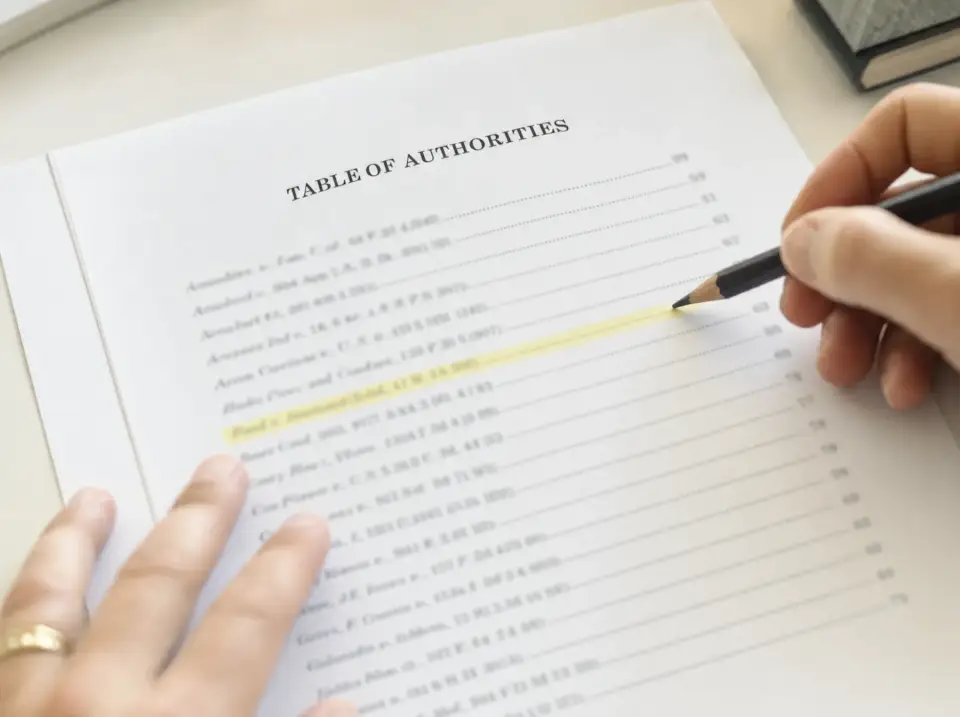
Your Table of Authorities, from the final PDF.
The list of every case, law and rule your brief cites, with the pages, built from your PDF in seconds.
Choose the brief you're filing (a PDF or a Word file) in the free Table of Authorities generator and download the finished table as a Word document. Your brief stays in your browser; it is never uploaded.
BriefAuthority is an independent, free browser tool that builds Tables of Authorities for U.S. legal briefs from the final PDF, a scanned PDF or the Word .docx.
The Court held in Rehaif v. United States, 139 S. Ct. 2191 (2019), that the government must prove knowledge of status under 18 U.S.C. § 922(g). Plain-error review under Fed. R. Crim. P. 52(b) asks, as in United States v. Olano, 507 U.S. 725 (1993), whether the error affected substantial rights. Id. at 734.
4Table of Authorities
Illustration · authorities from a public Supreme Court brief
The questionQuestion presented
Can you build a correct Table of Authorities on a Mac, from the PDF, without uploading a confidential brief to anyone?
Yes. That is the entire product. BriefAuthority reads the final PDF page by page in your browser, detects the authorities, shows you every page reference to confirm, and exports the table.
Why the PDF
Your Word file is the draft. Your PDF is the filing.
A Table of Authorities is only useful if its page references match the brief the court receives. BriefAuthority reads the final paginated PDF directly, including roman-numeral front matter and scanned pages.
How to make a Table of Authorities from a PDFAlmost ready
3 worth reviewing
97 cases, laws and rules · Formatted for the Supreme Court of the United States
Worth reviewing 3 · your call; never blocks the download. 3 lines we left out automatically: check them. Some are real cases with text picked up around them, 2 are decisions below in this same case. Review
TABLE OF CITED AUTHORITIES
Page(s)
Cases
Statutes
Rules
Works with
Does it work with my brief?
Final PDF
Page numbers from the pages as filed, roman front matter included.
Scanned PDF
Read with text recognition on your device, about 1–1.5 s a page. Nothing uploaded.
Word .docx
Add its final PDF and the finished table is written into your Word file, no Word for Windows needed. On Windows, Word can also build the table itself from tagged citations.
Google Docs, Pages, LibreOffice
Export to PDF or .docx, then drop it in.
Standard U.S. citation style (Bluebook) and the official styles of California, New York and Michigan; federal and state courts; ready-made formats for 36 courts. Supported files, citation styles and limits

Built for the last hour before filing, when the table is the only thing left.
The problemStatement of the case
The Table of Authorities is the last thing you build, on the day it's due, with the worst tools.
(a)Word for Mac
Microsoft's own support page: Tables of Authorities aren't supported in Word for Mac or Word for the web.
Pages and Google Docs have no Table of Authorities feature at all.
(b)The workarounds
Borrow a Windows PC, run Parallels, pay per document for a Windows add-in, or search every citation with ⌘F and type the page numbers by hand.
Each one costs the hour you don't have.(c)The shortcut
Paste the brief into a chatbot, and send confidential work product to a third party, with no guarantee the pages match what you file.
Pages from a paste are not pages from the PDF.Why it worksArgument
Four reasons, each with a figure. Read them the way a clerk reads a brief: the heading is the argument.
I. It reads the pages you will actually file.
BriefAuthority starts from the final PDF, not from hidden Word fields. Page references come from the printed labels: Roman front matter and a body restart where used, or continuous numbering from the cover where required. Confirm the mapping before export, then check a fresh PDF after inserting the table.
pdf p. 12 → printed p. 1pdf p. 3 → printed p. ii
II. You review every entry and suggestion.
See every authority and page beside its source citation. Fix a name, merge a short form or leave an entry out. On supported PDF analyses, source-backed "Also cited?" suggestions give you an Add or Not an authority choice; suggestions are not auto-added.
III. The brief never leaves your computer.
Your browser reads the file, finds the citations and writes the Word file, all on your device, scanned pages included. Nothing is uploaded: you can check it by going offline once the page has loaded.
IV. It exports a Table of Authorities that looks like one.
Category headings, alphabetized entries, dot leaders, page references, and passim only where your court still allows it, as a .docx you paste into the brief, in the same serif as the rest of your filing.
Table of Authorities
ii
AccuracyThe record
98.8%
cases found in the archived v2.1 benchmark, 2026-09-28.
In the archived v2.1 run of 2026-09-28, we measured the citation engine on 370 public briefs and motions from 118 federal and state courts (1971–2026), including self-represented briefs and scans, against the Tables of Authorities their counsel filed. On the 350 documents we could score, it found 13,133 of the 13,289 cases. Page lists matched counsel's exactly for 85.0% before review: 83.7% in federal courts, 82.7% in state courts. The 35-brief page-by-page comparison includes stale tables. Without six stale-table briefs, counsel's strict case page lists scored 92.1%, against 88.2% for the engine. These are our measurements of that historical release; methods and later release results are published separately below.
The benchmark: method, data, verified resultsModel-assistance evidence (October 7, 2026): actual Word exports, source checks and limitations.
Benchmark
370 public briefs from 118 federal and state courts (1971–2026) vs. the tables counsel filed
| Measure | Rate | Count |
|---|---|---|
| Cases foundvs. counsel's own tables, 350 scored documents | 98.8% | |
| Exact page listsall scored documents, before review (passim excluded) | 85.0% | |
| Federal appeals and district courtsexact page lists, 97 briefs | 83.7% | |
| State supreme and appellate courtsexact page lists, 164 briefs | 82.7% | |
| Scanned briefs, on-device OCRexact page lists, 7 scans | 83.6% | |
| Median time per brief | ≈8s | |
Exact means our page list is identical to counsel's. Counsel's tables have errors too, so we publish only the strict figure. Method, per-document data and the verified comparison on the benchmark page.
Find your situationIndex of situations
Find your situation.
- 1You're on a Mac and Word won't do itRead
- 2Word for Mac hides or lacks the TOA featureRead
- 3All you have is the final PDFRead
- 4You're the paralegal and it's due todayRead
- 5You're filing your own appealRead
- 6You drafted in Google Docs or PagesRead
- 7You can't upload the brief anywhereRead
- 8You're tempted to paste it into ChatGPTRead
- 9You don't have a Best Authority licenseRead
- 10You need your court's TOA requirementsRead
Guides, tools and comparisons.
- Table of Authorities generator
- Table of Authorities checker
- Compare two versions of a brief
- Proofreading checklist for a second reader
- Supported files, citation styles & courts
- Table of authorities format
- Real Word example and annotated samples
- Free .docx template
- Make one in Word (Windows)
- Page numbers wrong or not updating
- ezBriefs alternative (free)
- Clearbrief alternative (free)
- BriefAuthority vs BriefMark
- BriefAuthority vs Zero Witness
- Jurisage alternatives
- Accuracy benchmark and dated history
- Security & privacy
Reference: the rules, court by court.
Court-specific guidance with dated sources. Each guide identifies the text read and any official-source access limits. Useful whether or not you ever use BriefAuthority.
- What is a table of authorities?
- TOA rules: federal and state requirements
- Supreme Court rules (2026)
- When a Table of Authorities is required
- Passim: meaning, use and court rules
- Id. and supra: which pages to list
- Category order and alphabetizing
- Federal circuits (all 13 courts)
- Ninth Circuit
- Second Circuit
- Fifth Circuit
- Eleventh Circuit
- Rules by state (all 50 states)
- Record cites (J.A., ROA, ER, Appx)
- Asterisks: authorities chiefly relied upon
Browse guides for all 50 states
- Alabama appellate briefs
- Alaska appellate briefs
- Arizona table of citations
- Arkansas appellate briefs
- California (Rules of Court 8.204)
- Colorado appellate briefs
- Connecticut appellate briefs
- Delaware appellate briefs
- Florida table of citations
- Georgia appellate briefs
- Hawaii appellate briefs
- Idaho appellate briefs
- Illinois points and authorities
- Indiana appellate briefs
- Iowa appellate briefs
- Kansas appellate briefs
- Kentucky statement of points and authorities
- Louisiana appellate briefs
- Maine appellate briefs
- Maryland appellate briefs
- Massachusetts table of authorities
- Michigan citation style (no periods)
- Minnesota appellate briefs
- Mississippi appellate briefs
- Missouri appellate briefs
- Montana appellate briefs
- Nebraska appellate briefs
- Nevada appellate briefs
- New Hampshire appellate briefs
- New Jersey formal and letter briefs
- New Mexico appellate briefs
- New York (Appellate Division rules)
- North Carolina appellate briefs
- North Dakota paragraph numbers
- Ohio appellate briefs
- Oklahoma appellate briefs
- Oregon index of authorities
- Pennsylvania table of citations
- Rhode Island appellate briefs
- South Carolina appellate briefs
- South Dakota appellate briefs
- Tennessee appellate briefs
- Texas index of authorities
- Utah appellate briefs
- Vermont appellate briefs
- Virginia appellate briefs
- Washington appellate brief authorities
- West Virginia appellate briefs
- Wisconsin appellate briefs
- Wyoming appellate briefs
Where it fitsTable and filing workflow
Build the table. Check the final PDF.
Table checking and legal research.
Check table entries, brief pages and citation differences here. Use a citator or research service separately for good-law status and reporter pinpoints.
Your brief, with its table.
Read a PDF without changing it, or download a Word file with the table or TA fields added. Your argument text is not rewritten.
Fits your existing workflow.
Build your table here, or check one made in Word, Best Authority or another tool against the final PDF. You can keep your drafting setup.
Review every entry and check the final PDF before filing.
FAQReply
Short answers, on the record.
1.Can I make a table of authorities on a Mac?
Microsoft's support page says Tables of Authorities aren't supported in Word for Mac or Word for the web; some Mac builds still hide a legacy dialog. BriefAuthority runs in the browser on a Mac and builds the Table of Authorities from your final PDF, so Word's own table feature isn't needed. With the Word file and its final PDF, it writes the finished table into your .docx, with nothing to update in Word for Mac.
2.Does BriefAuthority upload my brief?
No. The PDF or .docx is read and indexed locally in your browser (scanned pages too, with text recognition on your device), and there is no upload endpoint for the brief. On the app page a Content-Security-Policy blocks connections to other hosts. You can confirm it in your browser's network panel, or by going offline after the page loads.
3.Where do the page numbers come from?
From the pages of the final PDF you will file, including roman-numeral front matter and briefs numbered from the cover. Every page reference is shown for review before export.
4.Does it work with scanned PDFs and Word files?
Yes. Scanned, image-only PDFs are read with text recognition (OCR) in the browser, on your device (about 1–1.5 seconds per page). With a Word .docx, add the final PDF of the same brief and it writes the finished table into the .docx, with page numbers from the PDF. On Windows it can instead tag each citation so Word builds and updates the table itself. Google Docs, Pages and LibreOffice: export to PDF or .docx first.
5.What does BriefAuthority check, and what needs legal research?
BriefAuthority checks table entries, brief pages and citation differences against your brief. Good-law status and reporter pinpoints — the specific pages within a reported decision — need a separate citator or research service. Review every entry and follow your court's rules.
6.What does it export?
A .docx Table of Authorities with category headings (cases, statutes, rules, constitutional provisions, other authorities), dot leaders, hanging indents, italic case names, page references, and "passim" (Latin for "throughout", written instead of a long page list) only where your court allows it (the Supreme Court's Rule 34.2 has barred it since January 1, 2023, and the rules effective March 16, 2026 keep that), or the table copied as text. Ready-made formats for 36 courts set the heading and the passim rule.
7.Does BriefAuthority use AI?
Rules and a citation parser build the table. On supported PDF analyses, a non-generative classifier on your device offers source-backed 'Also cited?' suggestions. Review the highlighted source and choose Add or Not an authority; suggestions are not auto-added. If the classifier is unavailable, you can still review and export the base table. No AI provider receives the brief.
8.How accurate is it?
Our archived v2.1 benchmark, dated 2026-09-28, found 98.8% of cases, with 85.0% exact page lists against counsel’s tables before review. It covered 370 public briefs from 118 courts, with 350 scored. These are our measurements of that release. Methods, the separate 35-brief page-by-page comparison and dated release results: briefauthority.com/table-of-authorities-benchmark. Review every entry and page before filing.
9.Is it available now, and what does it cost?
Yes. The app is live at briefauthority.com/table-of-authorities-generator, and it is free. No account, no Word add-in, no install.

Get startedConclusion
For the foregoing reasons, BriefAuthority respectfully requests that you open the app.
Free. No account. Drop the final PDF, a scan or the .docx, review every authority, and export the table. The brief stays on your computer.
Respectfully submitted,
/s/ BriefAuthority
for the Petitioner
- 1.Drop the brief: PDF, scanned PDF or Word .docx
- 2.Review every authority and its pages
- 3.Export a formatted .docx, or copy as text
Product updates (optional)